In the rapidly evolving landscape of frontend development, we often find ourselves caught in a familiar cycle: rapid prototyping leads to tightly coupled code, which eventually becomes a maintenance nightmare. As applications grow in complexity and teams expand, the technical debt accumulated from mixing UI concerns with business logic becomes increasingly expensive to address.
Today, I want to share an architectural approach that has transformed how we build and maintain frontend applications — one that draws inspiration from domain-driven design and clean architecture principles to create a clear separation between UI components and domain logic.
The Problem with Traditional Frontend Architecture
Most frontend applications suffer from tight coupling between UI and business logic:
- Difficult testing: Business logic embedded within UI components is hard to isolate and test.
- Tight coupling with backend models: API request/response models are often intertwined with UI code, making backend changes ripple through the frontend.
- Framework lock-in → Want to add a mobile app or change the framework from React to Angular? Rewrite everything
- Scattered dependencies: Changes in backend services or data sources require widespread code modifications.
- Slow adaptability: Enterprise applications face frequent UI changes driven by product evolution, increasing backlog, and technical debt.
- Rigid data sources and library integrations: Switching data sources (e.g., GCP to S3) or third-party libraries can be cumbersome.
This creates maintenance nightmares and slows down development as teams grow.

Our Solution: Clean Architecture for Frontend
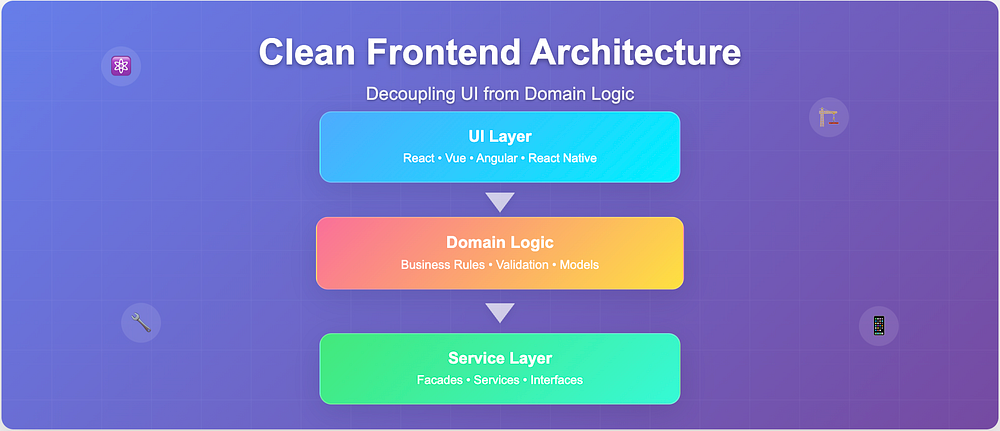
“UI framework dependencies should be kept separate from business logic”Layer Breakdown:
- Domain Logic Layer: Encapsulates business rules, validation, and state management, independent of any UI framework.
- UI Layer: Composed of framework-agnostic components responsible solely for rendering and user interaction.
- Abstraction Layer: Acts as a mediator, exposing domain logic to the UI via well-defined interfaces or services.

Implementation Details
Workspace and Code Structuring
We organize the codebase using a monorepo with packages structured by business domains:
- Models Package: Shared domain models are maintained separately, synchronized with backend APIs to reflect changes automatically.
- Domain Modules: Business logic libraries encapsulated per domain.
- UI Components: Common UI components shared across ReactJS and React Native apps.
- Third-party Integrations: Authentication, storage, and analytics are integrated as pluggable services without impacting domain logic.
This pattern cleanly separates UI from domain logic, enabling independent evolution and testing.

Code Examples
Before: Tightly Coupled Architecture
import React , {
	useState, useEffect }
from 'react' ;
const UserProfile = () => {
	// State management in UI component
	const [user, setUser] = useState ( null );
	const [loading, setLoading] = useState ( false );
	const [error, setError] = useState ( null ); // 🔴 Problem 1: API fetching in UI layer useEffect ( () => {
		const fetchUser = async () => {
			setLoading ( true );
			try {
				const response = await fetch ( '/api/user' );
				const data = await response. json (); // 🔴 Problem 2: Business logic in UI (data. orders && data. orders . length > ) {
					data. isPremium = data. orders . some ( order => order. total > 1000 && order. status === 'completed' ); }
				setUser (data); }
			catch (err) {
				setError (err. message ); }
			finally {
				setLoading ( false ); } };
		fetchUser (); }, []); // 🔴 Problem 3: Presentation mixed with logic
	return ( <div> {loading && <p>Loading...</p>} {error && <p>Error: {error}</p>} {user && ( <div className={user.isPremium ? 'premium-badge' : ''}> <h2>{user.name}</h2> <p>Email: {user.email}</p> {/* More UI... */} </div> )} </div> ); };
useState, useEffect }
from 'react' ;
const UserProfile = () => {
// State management in UI component
const [user, setUser] = useState ( null );
const [loading, setLoading] = useState ( false );
const [error, setError] = useState ( null ); // 🔴 Problem 1: API fetching in UI layer useEffect ( () => {
const fetchUser = async () => {
setLoading ( true );
try {
const response = await fetch ( '/api/user' );
const data = await response. json (); // 🔴 Problem 2: Business logic in UI (data. orders && data. orders . length > ) {
data. isPremium = data. orders . some ( order => order. total > 1000 && order. status === 'completed' ); }
setUser (data); }
catch (err) {
setError (err. message ); }
finally {
setLoading ( false ); } };
fetchUser (); }, []); // 🔴 Problem 3: Presentation mixed with logic
return ( <div> {loading && <p>Loading...</p>} {error && <p>Error: {error}</p>} {user && ( <div className={user.isPremium ? 'premium-badge' : ''}> <h2>{user.name}</h2> <p>Email: {user.email}</p> {/* More UI... */} </div> )} </div> ); };
After: Clean Architecture Implementation
// ------------------------------- // SERVICE LAYER (api/userService.ts) // ------------------------------- export
class UserService {
	// ✅ Only data fetching concerns async fetchUser (): Promise < UserResponse > {
		const response = await fetch ( '/api/user' );
		return response. json (); } } // ------------------------------- // DOMAIN LAYER (domain/userDomain.ts) // ------------------------------- export
class UserDomain {
	constructor ( private userService: UserService ) {} // ✅ Pure business logic async getUser (): Promise < User > {
		const userData = await this . userService . fetchUser (); // Business rules encapsulated
		return {
			...userData, isPremium : this . checkPremiumStatus (userData) }; } // ✅ Testable without UI/API private checkPremiumStatus ( user : UserResponse ): boolean {
		return user. orders ?. some ( order => order. total > 1000 && order. status === 'completed' ) || false ; } } // ------------------------------- // UI LAYER (components/UserProfile.tsx) // -------------------------------
import React , {
	useState, useEffect }
from 'react' ;
import {
	UserDomain }
from 'domain/userDomain' ;
import {
	UserService }
from 'services/userService' ;
const UserProfile = () => {
	const [user, setUser] = useState< User | null >( null );
	const [loading, setLoading] = useState ( true );
	useEffect ( () => {
		// ✅ Clean composition
		const userDomain = new UserDomain ( new UserService ());
		userDomain. getUser () . then (setUser) .
		finally ( () => setLoading ( false )); }, []); // ✅ Only presentation concerns
	return ( <div> {loading ? <p>Loading...</p> : user && ( <div className={user.isPremium ? 'premium-badge' : ''}> <h2>{user.name}</h2> <p>Email: {user.email}</p> </div> )} </div> ); };
class UserService {
// ✅ Only data fetching concerns async fetchUser (): Promise < UserResponse > {
const response = await fetch ( '/api/user' );
return response. json (); } } // ------------------------------- // DOMAIN LAYER (domain/userDomain.ts) // ------------------------------- export
class UserDomain {
constructor ( private userService: UserService ) {} // ✅ Pure business logic async getUser (): Promise < User > {
const userData = await this . userService . fetchUser (); // Business rules encapsulated
return {
...userData, isPremium : this . checkPremiumStatus (userData) }; } // ✅ Testable without UI/API private checkPremiumStatus ( user : UserResponse ): boolean {
return user. orders ?. some ( order => order. total > 1000 && order. status === 'completed' ) || false ; } } // ------------------------------- // UI LAYER (components/UserProfile.tsx) // -------------------------------
import React , {
useState, useEffect }
from 'react' ;
import {
UserDomain }
from 'domain/userDomain' ;
import {
UserService }
from 'services/userService' ;
const UserProfile = () => {
const [user, setUser] = useState< User | null >( null );
const [loading, setLoading] = useState ( true );
useEffect ( () => {
// ✅ Clean composition
const userDomain = new UserDomain ( new UserService ());
userDomain. getUser () . then (setUser) .
finally ( () => setLoading ( false )); }, []); // ✅ Only presentation concerns
return ( <div> {loading ? <p>Loading...</p> : user && ( <div className={user.isPremium ? 'premium-badge' : ''}> <h2>{user.name}</h2> <p>Email: {user.email}</p> </div> )} </div> ); };
Key Benefits We’ve Seen
- Improved maintainability: Changes in UI or domain logic remain isolated, reducing regression risk.
- Enhanced testability: Business logic is independently testable without UI dependencies.
- UI framework flexibility: The UI layer can switch frameworks (e.g., React to React Native or Angular) without rewriting domain logic.
- Scalability: Modular design supports large enterprise applications with multiple teams.
- Metrics:
- 40% reduction in UI-related bugs
- 70% faster onboarding for new developers
Lessons Learned
Start Simple: Don’t over-abstract initially. Extract patterns as they emerge.
Performance Matters: The extra indirection can impact performance. Use memoization and code splitting strategically.
Team Adoption: Developers need time to adapt. Provide clear examples and gradual migration paths.
When to Use This Approach
This architecture works best for:
- Applications with complex business logic
- Teams planning multiple UI platforms (web + mobile)
- Long-term projects where maintainability matters
- Codebases with frequent UI changes
For simple CRUD apps or prototypes, it might be overkill.
Conclusion
- Recap the philosophy: “UI frameworks are delivery mechanisms, not architecture.”
- Call-to-action: “Try isolating one domain in your codebase — we bet you’ll never go back.”
Separating UI from business logic isn’t just good practice — it’s essential for building maintainable frontend applications at scale. While it requires initial setup, the long-term benefits in testability, maintainability, and flexibility make it worthwhile.
The key is treating your frontend like the complex application it is, not just a thin UI layer.
What’s your experience with frontend architecture patterns? Have you faced similar challenges? I’d love to hear your thoughts in the comments below.