

What is the One Billion Row Challenge?
The 1 Billion Row Challenge is a benchmark exercise that tests how well a system can handle, process, and query a massive dataset containing one billion rows. The idea is to push the limits of data ingestion, memory usage, CPU performance, and query optimization in a real-world scenario where scale matters. It’s a practical way to explore performance bottlenecks and experiment with optimizations when dealing with truly large datasets. You can check out the original repository for the challenge here: https://github.com/gunnarmorling/1brc.
When the One Billion Row Challenge was announced in January 2024, I was immediately captivated by the idea of harnessing Go to process a massive dataset as efficiently as possible — even though the challenge was originally meant for Java. I first dipped my toes into the challenge during March–April 2024, but my initial attempt didn’t hit the performance marks I was aiming for. It wasn’t until I attended Gophercon 2024 and watched an inspiring talk on the topic (Gophercon 2024 Talk) that my passion was reignited. With fresh insights and renewed determination, I set out to optimize my solution once again — iterating through eight distinct versions until I finally achieved a processing time of just 3.08 seconds.

The Evolution of My Solution
My journey began with a straightforward, idiomatic Go solution. Over time, I incorporated various optimizations aimed at reducing overhead, leveraging concurrency, and fine-tuning data structures.
v1 — The Baseline
In my initial version, I relied on the standard library functions such as strings.Splitand bufio.Scanner to parse the file. While this implementation was easy to write, it quickly became apparent that the standard library’s convenience came at a performance cost. That said, this is by no means a recommendation to avoid using the standard library — its functions are robust and cover a wide range of edge cases. The custom optimizations were only considered for an extreme case like this, where the data is well-defined and under set bounds.
v2 & v3 — Eliminating Unnecessary Overhead
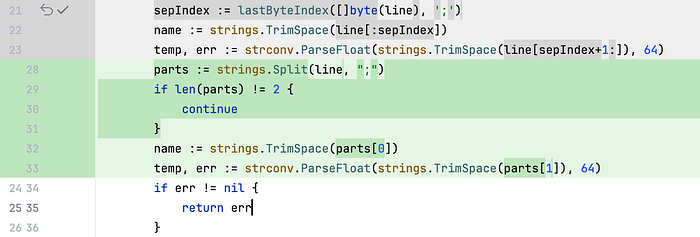
In version 2, I removed strings.Split to avoid extra string allocations, and in version 3, I replaced bufio.Scanner with a more controlled reading mechanism. These changes laid the groundwork for more substantial improvements later on.
func lastByteIndex (in [] byte , n byte ) int {
	for i := len (in) - ;
	i >= ;
	i-- {
		in[i] == n {
			return i } }
	return }
for i := len (in) - ;
i >= ;
i-- {
in[i] == n {
return i } }
return }
buf := make ([] byte , BufferSize) readStart :=
for {
	n, readErr := in.Read(buf[readStart:]) readErr != nil && !errors.Is(readErr, io.EOF) {
		panic (readErr) }
	readStart+n == {
		break }
	chunk := buf[:readStart+n] newLine := bytes.LastIndexByte(chunk, '\n' ) newLine < {
		break }
	remaining := chunk[newLine+:] chunk = chunk[:newLine+] start :=
	for i := ;
	i < len (chunk);
	i++ {
		// process the chunk }
	readStart = copy (buf, remaining) }
for {
n, readErr := in.Read(buf[readStart:]) readErr != nil && !errors.Is(readErr, io.EOF) {
panic (readErr) }
readStart+n == {
break }
chunk := buf[:readStart+n] newLine := bytes.LastIndexByte(chunk, '\n' ) newLine < {
break }
remaining := chunk[newLine+:] chunk = chunk[:newLine+] start :=
for i := ;
i < len (chunk);
i++ {
// process the chunk }
readStart = copy (buf, remaining) }
This approach pre-allocates a buffer that is reused in subsequent iterations, avoiding repeated memory allocations and reducing the frequency of garbage collection calls.
v4 — Custom Parsing and Data Type Tweaks
Realizing that the standard library parsing functions were slowing me down, I wrote a custom parser to convert strings to int64 and swapped out float64 for int64 wherever possible. Here’s a snippet from my custom parser:
// Custom parser snippet
from v4:
var isNeg bool
var temp int64 index := chunk[] == '-' {
	isNeg = true index++ }
for ;
index < len (chunk);
index++ {
	chunk[index] == '\n' {
		break }
	chunk[index] == '.' {
		// Skip the decimal point. continue }
	temp = temp* + int64 (chunk[index]- '0' ) }
isNeg {
	temp = -temp }
from v4:
var isNeg bool
var temp int64 index := chunk[] == '-' {
isNeg = true index++ }
for ;
index < len (chunk);
index++ {
chunk[index] == '\n' {
break }
chunk[index] == '.' {
// Skip the decimal point. continue }
temp = temp* + int64 (chunk[index]- '0' ) }
isNeg {
temp = -temp }
v5 — Harnessing the Power of Concurrency
I knew that Go’s concurrency model could be a game changer. In version 5, I restructured the program to split the input file into chunks and process each concurrently in its own goroutine. This change reduced the processing time dramatically — from minutes to just 11 seconds. Here’s how I set up the concurrent processing:
// Launching goroutines
for each chunk in v5: chunks, err := splitChunks(fileName, runtime.NumCPU()) err != nil {
	return err }
resultsCh := make ( chan *hashBucket)
var chunkWg sync.WaitGroup chunkWg.Add( len (chunks))
for _, chunk := range chunks {
	processChunk(fileName, chunk, resultsCh, &chunkWg) }
func {
	chunkWg.Wait() close (resultsCh) }()
for each chunk in v5: chunks, err := splitChunks(fileName, runtime.NumCPU()) err != nil {
return err }
resultsCh := make ( chan *hashBucket)
var chunkWg sync.WaitGroup chunkWg.Add( len (chunks))
for _, chunk := range chunks {
processChunk(fileName, chunk, resultsCh, &chunkWg) }
func {
chunkWg.Wait() close (resultsCh) }()
v6 — Optimizing Data Structures
Version 6 involved reducing the overhead associated with frequent map accesses. By using pointers to streamline memory access, I managed to shave the execution time down further to 5.7 seconds.

v7 — Custom Hash Buckets with FNV-1
In v7, I replaced Go’s standard map with a custom hash bucket implementation using the FNV-1 hash algorithm. This not only boosted speed but also improved the memory access pattern. Below is an excerpt from my process_v7.go file:
// Excerpt
from process_v7.go showing FNV-1 hash computation:
var hash uint64 = offset64
for i := ;
i < len (chunk);
i++ {
	c := chunk[i] c == ';' {
		stationName, chunk = chunk[:i], chunk[i+:] break }
	hash *= prime64 hash ^= uint64 (c) }
from process_v7.go showing FNV-1 hash computation:
var hash uint64 = offset64
for i := ;
i < len (chunk);
i++ {
c := chunk[i] c == ';' {
stationName, chunk = chunk[:i], chunk[i+:] break }
hash *= prime64 hash ^= uint64 (c) }
This custom implementation allowed me to merge results from multiple goroutines efficiently and sort the final output by station name.
FNV-1 was chosen as the hashing algorithm because it efficiently produces a numerical hash, making it easy to generate an index for our hash bucket. Its simplicity and speed, combined with a good balance between distribution quality and performance, make it ideal for scenarios where fast, non-cryptographic hashing is required. Unlike more complex algorithms, FNV-1 ensures minimal collisions while maintaining a lightweight computational footprint, making it well-suited for hash table indexing.
v8 — Final Optimization with Profile Guided Optimization (PGO)
The latest iteration, v8, saw me leveraging Profile Guided Optimization (PGO) to generate an even more refined binary. Although the performance improvement from v7 was incremental, PGO brought the execution time down to an impressive 3.08 seconds. This final tweak underscored that even after extensive code-level optimizations, advanced compiler techniques can still extract additional performance gains.
go build -o 1brc -pgo profiles/v8.out cmd/1brc.go
Performance Metrics
Here’s a quick look at the performance improvements achieved from v1 through v8:
- Execution Time: Reduced from 148.46 seconds to 3.08 seconds (a 97.92% improvement).
- Memory Usage: Dropped from approximately 45GB to just 321MB (a 99.31% reduction).
- Allocation Efficiency: Memory allocations decreased from 2GB per operation to just 11KB per operation.
All benchmarks were run on a 2021 M1 Pro MacBook Pro with 16GB of RAM.
How to Run the Code
If you’re interested in experimenting with the challenge yourself, here’s how you can run my solution:
- Prepare the Input File:
Place your input file in thetestdatafolder (or create a symlink to it). - Run a Specific Version:
Use the provided Makefile to run your desired version. For instance, to run v6, execute:
make run VERSION=v6
- Testing and Benchmarking:
You can run tests and benchmarks with:
make test make bench VERSION=v6
Final Thoughts
The One Billion Row Challenge pushed me to explore the depths of Go’s performance capabilities. My initial attempt in March–April 2024 didn’t meet my expectations, but the spark reignited at Gophercon 2024 set me on a path of relentless optimization. From refactoring parsing logic to harnessing concurrency and finally employing advanced compiler techniques like PGO, every step of the journey taught me invaluable lessons about performance tuning in Go.
I hope my story and the insights I’ve shared inspire you to tackle your own optimization challenges. Thank you for following along on my journey, and happy coding!
Keep an eye out for Go 1.24 — I’ve heard that with Go 1.24, maps are touted to get a huge performance boost! Once Go 1.24 is released, I plan to re-run my benchmarks to see how much further I can push the limits. Stay tuned for those updates