

We discussed in the previous post about the importance of functional testing coverage before embarking on modernizing legacy codebase.
Let us start with a simple question - why can't I use Claude code out of the box, to generate automated functional tests. Can I not point it to the frontend code and ask it to generate functional tests?
I had doubts about whether this would work but I wanted to try nonetheless. I asked Claude to generate page objects, on a project, and it was quite off. It got the high level page abstraction correct to some extent. But overall it was far from usable. The main reason, why we cannot do this, is in the question/answer below.

By the way, it is quite possible that one:
- doesn't even have access to the source code of the system one has to write functional tests
- the application under test is solution that is created from several repositories being put together (e.g. micro frontends, server side rendering from multiple BFF repositories, data dependence)
What if we consider the source of truth to be the actual application seen by the user and not the source code that generates it?Accessibility Tree and DOM as the Source
This is closest to the truth in plain-text one can be for functional tests for an application. These are not available to Claude. If they were then Claude could potentially, generate the test code. Based on this hypothesis, I went about creating this project.

This project is a Claude Code plugin that does the following:
You describe a scenario, the agent walks through it in a real browser, reads the accessibility tree at every step, and generates the page object classes for you — with stable accessible selectors, typed navigation between pages.
At the heart of solution is the agent loop
The core problem is that writing a page object requires knowing what is on the page — but the only way to know what is on a page is to be there. The plugin solves this by giving the agent a perception tool and a set of action tools, then letting it drive the browser step by step through the scenario the user described.
Before each interaction, the plugin calls get_accessibility_tree to snapshot the live ARIA role tree of the current page. This gives the agent the structure, labels, and interactive elements it needs to decide what to do next — and crucially, what selector to record for each element.
snapshot current page via get_accessibility_tree
  ↓
identify the next step of the scenario (click, type, navigate)
  ↓
execute the step — browser state changes
  ↓
snapshot again
  ↓
continue until the full scenario is complete
At each step the agent also records which page it is on, what elements were present, and which action caused a navigation to a new page. The agent is not replaying a fixed script — it is reasoning about the current state of the browser at every step, which means it handles redirects, conditional UI, and intermediate states naturally.
Why Page Objects
Page Object is the most important design pattern that brings sanity to otherwise procedural codebases that I have come across without them. The tools we use should natively understand page objects - otherwise even if the tool uses AI it is not likely to creating maintainable codebase of tests. Hence they are central to the solution.
How to use the plugin
This project uses the plugin from Claude code to generate functional tests. The plugin provides two Claude commands currently - /bu:record-page-objects and /bu:record-workflow. These commands guide the user through the process. Mainly the user provides a prompt like:
login using User=demo@wbd
  Password=password

  search for default subjects and open a subject
The plugin then launches the browser, derives the actions from the prompt, performs them and generates the code. It generates 5 page object classes containing all the element, of interest, in the page.

e.g. Search Filter Page is:
import { Page } from '@playwright/test';
import { SearchResultsPage } from './search-results-page';

export class SearchFilterPage {
  excavatingMachineButton = this.page.getByRole('button', { name: 'Excavating Machine Excavating Machine' });
  farmerButton = this.page.getByRole('button', { name: 'Farmer Farmer' });
  gramPanchayatButton = this.page.getByRole('button', { name: 'Gram panchayat Gram panchayat' });
  workOrderButton = this.page.getByRole('button', { name: 'Work Order Work Order' });
  nameInput = this.page.getByRole('textbox');
  locationCombobox = this.page.getByRole('combobox');
  includeVoidedCheckbox = this.page.getByRole('checkbox', { name: 'Include Voided' });
  displayCountCheckbox = this.page.getByRole('checkbox', { name: 'Display Count' });
  searchLink = this.page.getByRole('link', { name: 'Search' });
  cancelLink = this.page.getByRole('link', { name: 'Cancel' });

  constructor(private readonly page: Page) {}

  async search(): Promise<SearchResultsPage> {
    await this.searchLink.click();
    return new SearchResultsPage(this.page);
  }
}
Once these page objects are generated, they become statically available in the code of the developer. After this they can fully utilize the powers offered by Claude code like everything else.
If the user runs an overlapping scenario or if the app updates then one can expect that Claude would update these same page classes. e.g.
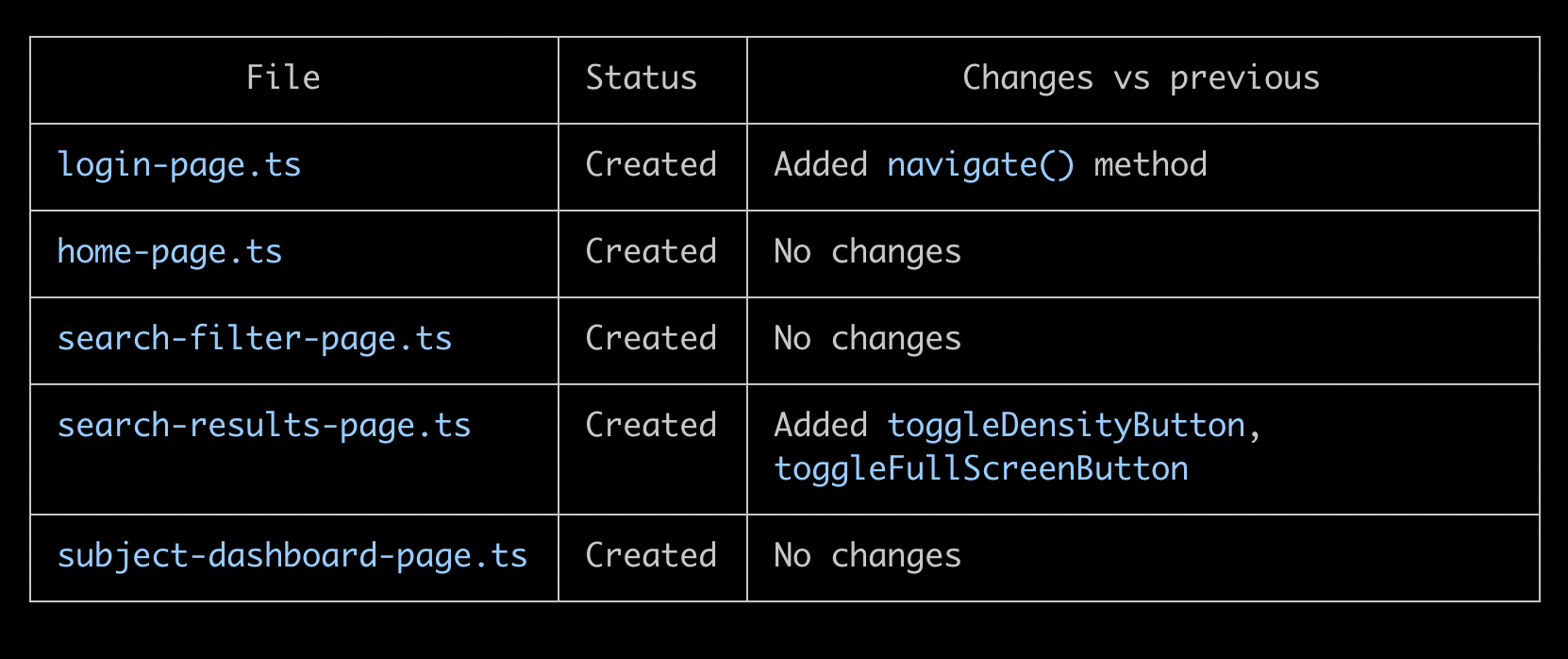
There is more to say here, but please head over here for documentation or ping me. I will be happy to discuss more. I will continue to add to this project. Right now it is a demonstration of concept of how we can use AI in functional testing.
Once we have connected Claude code to the browser in this way. There are several related automations that become possible (some spike code present in the project already) at the same time utilizing the power of playwright ecosystem. We can use prompts and do the following:
- Create workflow functions that utilize page objects.
- Running ad-hoc scenarios without generating test.
- Running ad-hoc scenarios in the user's browser tabs using playwright-crx (as apps of Google resist automation). These likely will work far better than tools like nano browser, since we have best in class agent harness in Claude.