
If you listen to very senior engineers, then it appears that they are fast moving towards, if not already in, a scenario where 100% of the code is being written by the agents. The rate at which we are writing code, one can argue that one is working on a legacy code if one starts on a new project 2 weeks after it started. It will be safe to say that we will be working on legacy codebases far far more than before. Hence I want to explore the possibilities, state of art, and discover techniques for modernizing legacy systems.
I would do this with actual evidence in an open source manner - sharing the code and my commentary.
Let us start with what is possible with Claude Code / Codex in the hands of very senior engineers. Why very senior engineers? So that we can examine how far these coding agents can be pushed - without the person driving it being the bottleneck. To see the possibilities we would try to setup a really complex scenario for an engineer who has been put on a project like one below:
- He/she has never worked on it this code before
- It is a full stack project and many parts of the stack are new to the person
- The project has many of DevX, CI/CD, DevOps, Observability capabilities missing
- Doesn't have automated functional tests coverage and no performance tests
- It may have security, performance, concurrency, and reliability issues
- The code complexity has slowed down the development on this project in many areas
- Possibly the key framework/language/libraries have not been upgraded in quite some time
- The configuration, feature flag, secrets management approach has not kept pace with the industry standard approaches
- One has very little help available to work on this project
Broadly we can split the above into three categories.
- Core software (5, 6, 7)
- Supporting software, core but lower risk to fix issues (3, 4, 8)
- Developer capability / support (1, 2, 9)
Given that I have AI with me now I would start with making sure that I have following in place before I do anything else. In this first article, will cover the first two. 3 & 4, we will cover in the next blog.
- I can run the product and all the tests on my local machine
- I can run publish the artifacts for production-like servers via CI/CD pipeline (i.e. setup CI/CD pipeline, generate deployable)
- I can run the product on a production-like server, pulling from CI/CD pipeline (setup infrastructure as code to provision and deploy)
- I have a functional test suite that provides me protection against anything else I do
It is important to remember that pre-AI this remained just an aspiration in many projects - as the business owners, justifiably, wouldn't approve such a long period before anything business-wise meaningful is worked upon.It is possible that the projects I choose have the supporting code already. Since this is a simulation - we can assume that it doesn't exist and how should we go about building it.
I am picking up OpenEdx as the project to work on. I know nothing about this codebase - except it has something to do with education. I am not very experienced in python too. Platform & App are two repositories of interest. My forked repositories are here (where you can find commits).
1. Run the product and all the tests on local
Makefile

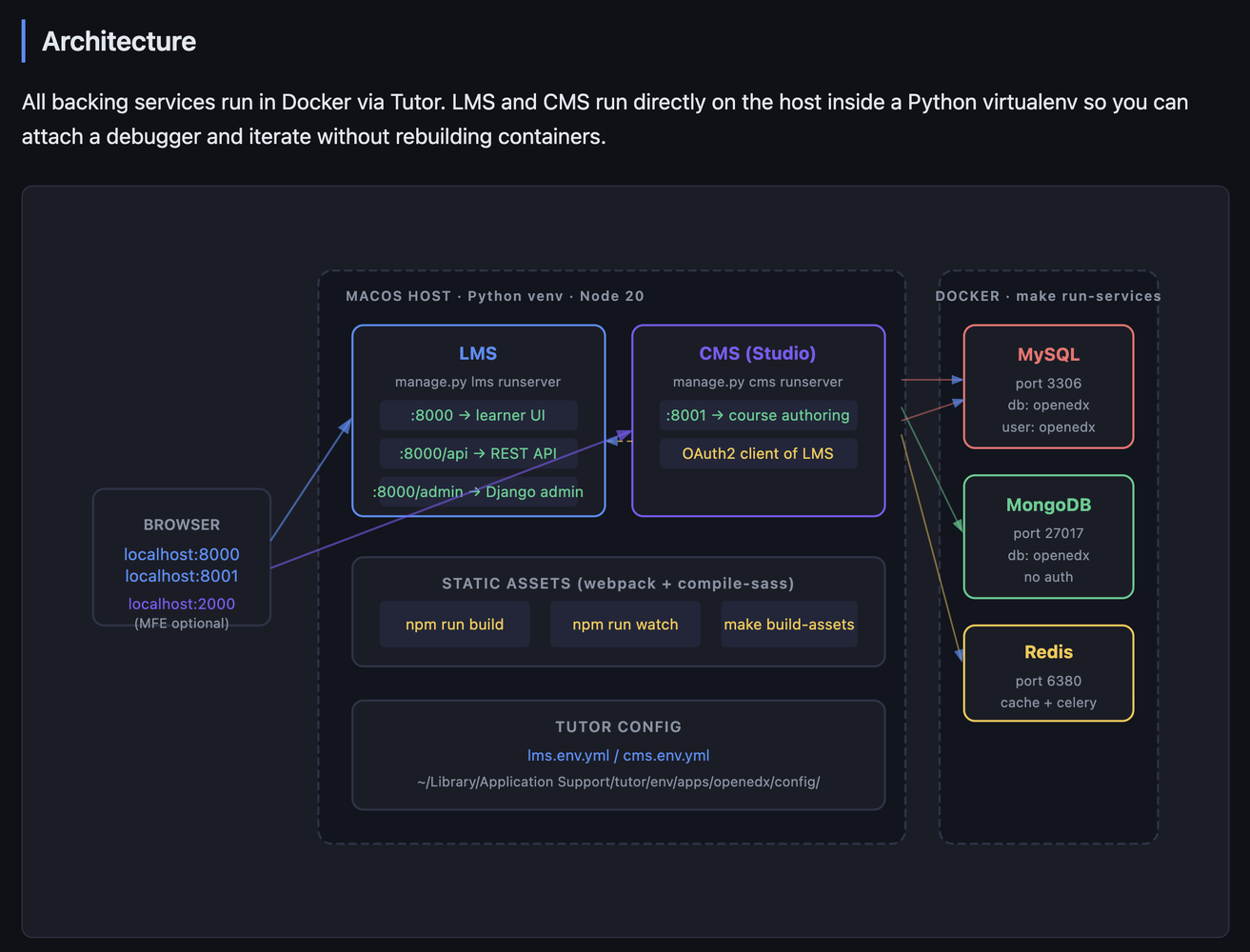
  The upstream repo only supports running LMS/CMS inside
   Docker (Tutor). To run them directly on macOS for
  faster iteration, new targets were needed:
  macos-requirements and PKG_CONFIG_PATH auto-detection
  to get Python deps building on macOS, run-lms/run-cms
  to start dev servers on the host,
  migrate-lms/migrate-cms with Tutor config so
  migrations hit the right database, and
  build-assets/watch-assets for webpack + SASS
  compilation outside Docker.

cms/envs/devstack.py

  The upstream CMS devstack settings were incomplete for
   running outside Docker — they had Docker-internal
  hostnames for services, missing theme/site config that
   caused Django startup errors, and OAuth2 URLs
  hardcoded to port 18000 (the upstream LMS default)
  instead of 8000 (where LMS runs locally). The default
  cache was also pointing to Memcached which Tutor
  doesn't run, causing 500 session errors on every
  request. All of these were fixed to mirror what was
  already working in lms/envs/devstack.py.

lms/envs/devstack.py

  Same Memcached problem as CMS — the default cache
  backend pointed to localhost:11211 which doesn't exist
   in Tutor, causing Django's session backend to raise a
   500 on every request. Service hostnames also pointed
  to Docker-internal names (redis, mongodb, etc.)
  unreachable from the host. Redis is available at
  127.0.0.1:6380 so the cache and all service hosts were
   overridden to use that.

scripts/tutor/docker-compose.ports.yml (new)

  Tutor's Docker Compose config doesn't expose MySQL,
  MongoDB, or Redis ports to the host by default —
  they're only accessible between containers. Running
  LMS/CMS directly on macOS requires reaching these
  services from outside Docker, so this override file
  binds their ports to 127.0.0.1.

scripts/copy-node-modules.sh

  The script used cp --force, a GNU coreutils long-form
  flag not recognised by macOS's BSD cp, causing npm
  install to fail on macOS. Replaced with the portable
  short form cp -f.
Even though this is a working software due to my own context and preference, I need to adapt it for future productivity. Hence supporting mac and hot reload for the source code.
Building the app
The project already had Github actions, but it wasn't generating the docker image - due to how the project is managed between apache foundation & open edx. If I am working the code I would want to make code changes and deploy them - hence created new GHA workflow for the same so:
So the single Docker image ships the complete LMS/CMS — Django backend + all compiled JS/React/CSS assets together.Commentary & Takeaways
- At this stage developing a conceptual understanding of the build and deployment architecture of the software is the key.
- One must setup oneself for future productivity by adapting the DevX, as per their or team's style and context.
- Documentation: I generate documentation that I would use regularly. The less frequently used documentation I can anyway generate on demand. Apart from the cognitive load, documentation generated from code, is a duplication, which one must be aware of. Finally, I prefer HTML documentation over markdown for humans. The editing of html is done by the agent anyway.
Build tools for agents
Even when using AI, there are several repeated inefficient workflows. e.g.
- Navigate to page in browser. Get error. Look for error in browser console, network calls or the page itself. Feed this along with context to agent to identify the problem and fix.
- Run an API. Get error. Look for error in logs. Feed this along with context to agent to identify the problem and to fix it.
- CI failure. Copy error and feed this along with context to agent to identify the problem and fix it.
Following is a tool/skill written for Claude Code to fix CI failures on its own. Oh and Claude generated its own skill / tool :-).---
name: check-ci
description: Check GitHub Actions CI status for the current repo and branch
allowed-tools: Bash(gh *), Bash(git *), Bash(bash *)
---
1. Get the current repo and branch:
```bash
git remote get-url origin
git branch --show-current
```
Extract the `owner/repo` from the remote URL (strip `.git`, handle both SSH and HTTPS formats).
2. List available workflows and their most recent runs for this repo:
```bash
gh run list --repo <owner/repo> --branch <branch> --limit 3 --json workflowName,status,conclusion,databaseId,createdAt
```
Present the unique workflow names to the user as a numbered list and ask them to choose one.
3. Once the user picks a workflow, run the script:
```bash
bash ~/.claude/skills/check-ci/run.sh <owner/repo> <branch> "<workflow-name>"
```
4. Analyse the script output and report back:
- **Status**: workflow name, branch, run time, pass/fail/in-progress
- **Failed step**: exact step name that failed (if any)
- **Failure reason**: only the key error lines explaining why it failed
- **Suggested fix**: a concrete next action to resolve the failure#!/bin/bash
REPO=$1
BRANCH=$2
WORKFLOW=$3
RUN_ID=$(gh run list \
--repo "$REPO" \
--branch "$BRANCH" \
--workflow "$WORKFLOW" \
--limit 1 \
--json databaseId \
--jq '.[0].databaseId')
if [ -z "$RUN_ID" ]; then
echo "No runs found for workflow '$WORKFLOW' on branch '$BRANCH'"
exit 1
fi
echo "=== RUN SUMMARY ==="
gh run view "$RUN_ID" --repo "$REPO"
echo ""
echo "=== FAILED STEP LOGS ==="
gh run view "$RUN_ID" --repo "$REPO" --log-failedThere is more to say, but this is already too long, more in future posts in this series.

%20cover%20image.png)